Refinance Break-Even Spreadsheet
Compare existing and proposed home loans in Excel. Include switching costs, annual fees, repayment frequencies, break-even timing and one-, three- and five-year differences.
Check whether a proposed refinance recovers its upfront costs under the figures you enter. This free refinance spreadsheet separates repayment relief from lifetime cost, shows a monthly cash-flow comparison and makes switching charges visible. Results are estimates, not guaranteed savings.
Free XLSX. No signup or email required.
Reviewed and maintained by the Calcy team · 17 October 2026 · General information, not personal financial advice.
Inside the workbook
- Dashboard
- Current Loan
- Proposed Loan
- Break-Even Analysis
- Year-by-Year Comparison
- Charts
- Instructions
XLSX for Excel. Editable inputs, protected formulas, no macros or external data connections. Save a personal copy before editing.
Start with the remaining loan, not a fresh borrowing amount
Enter your remaining balance, current rate and remaining term on Current Loan. Proposed Loan uses the same principal with its own rate, term and frequency. Application, valuation, legal, discharge and custom switching costs are entered separately. Costs are paid in cash rather than added to the refinanced balance.
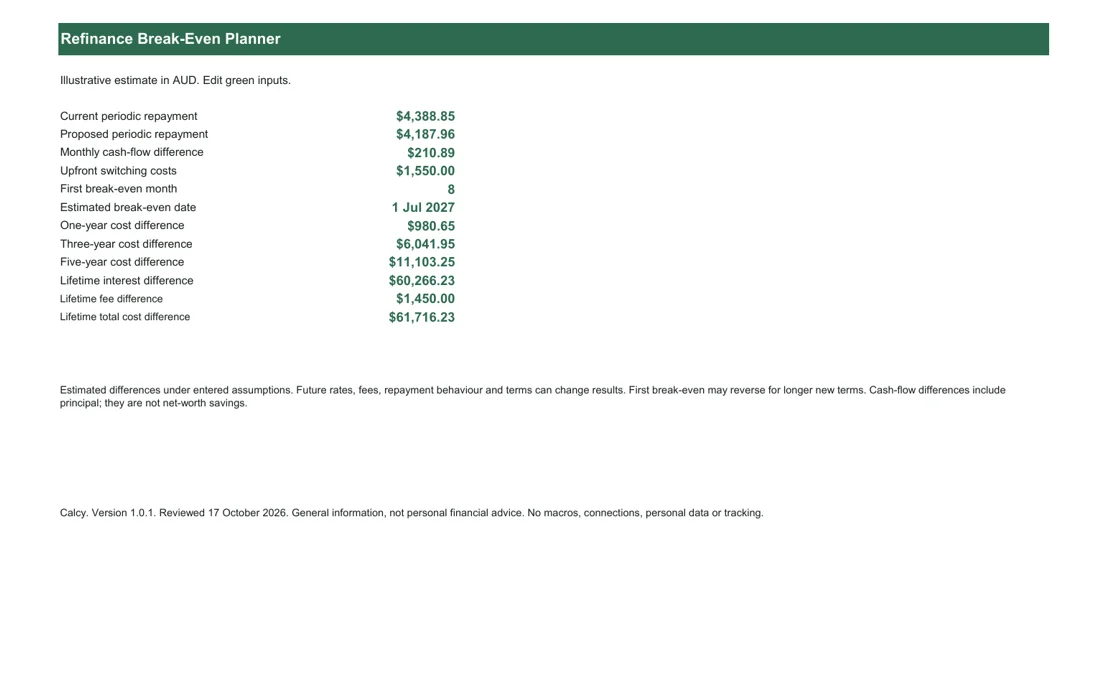
The Dashboard compares current and proposed repayments, monthly cash-flow difference, upfront costs and the first estimated break-even month/date. One-, three- and five-year differences sit beside lifetime interest, fee and total-cost differences. The detailed monthly and annual views explain how those figures accumulate.
Worked example: fees change the break-even point
The illustrative starting case is a $650,000 balance at 6.50% with 25 years remaining, compared with 6.00% over the same term. Annual fees are $420 currently and $300 proposed. Application, valuation, legal, discharge and other costs total $1,550. None of these figures is a current lender offer.
The schedule compares the constant-rate repayments and $10 monthly recurring-fee difference, then subtracts the $1,550 upfront cost. The first non-negative cumulative value is the first break-even month. Increase switching costs and that point moves later; raise the proposed rate and the costs may not be recovered within the modelled terms.
Monthly budgets and first break-even have limits
Required payments use the same frequency-aware mortgage formula as Calcy. Monthly cases also match the underlying monthly repayment function in the refinance engine. Weekly and fortnightly payments are annualised into monthly budgeting equivalents for the cash-flow comparison. The schedule does not simulate actual bank debit dates. The displayed break-even date advances by calendar months using EDATE: a shorter destination month clamps to its last day, and month zero keeps the start date.
Each loan stops making repayments and incurring recurring fees at its own term. First break-even is a first crossing, not a promise that refinancing stays ahead. Extending the new term can reduce early repayments but create later costs after the existing loan would have ended. Inspect the full chart and lifetime result before interpreting an early positive difference.
Read estimated differences without treating them as advice
Before proceeding, ask the existing lender for a dated payout estimate and the proposed lender for its complete fee schedule. Revisit the break-even result if either quote changes. Keep a separate cash buffer for moving costs or other expenses that are outside this loan comparison and should not be called refinance savings.
Positive cost differences mean the proposed path has lower cash outflow under the entered assumptions. Horizon figures include principal, so they are not net-worth savings: remaining debts can differ. Lifetime interest difference plus fee difference reconciles to the total cost difference. Future savings depend on rates, fees, repayment behaviour and terms remaining as entered.
There is no automatic fixed-rate break-cost or LMI estimate, no cashback and no offset assumption. Enter actual quoted costs in the custom field where applicable, without repeating a discharge charge elsewhere. The model excludes tax and changing interest rates. Zero costs and a positive monthly difference show immediate break-even; equal costs with no upfront charge reach equality at month one. Save the assumptions and compare with lender documents.
Check the method and compare online
General context: ASIC Moneysmart: switching home loans. Calculations use the methodology and assumptions explained above.
Optional email updates
Get new Calcy tools and home-buying updates
Free calculators, spreadsheets and practical Australian home-buying resources. Unsubscribe anytime. Confirm your address by email before receiving updates. Downloading never signs you up.
Frequently asked questions
Does a lower monthly repayment guarantee a lower lifetime cost?
No. A longer proposed term can lower repayments while increasing total interest or fees. Compare both the horizon and lifetime figures.
Does first break-even mean the savings remain positive?
No. The first crossing can reverse later when terms differ. Review the full cumulative chart and lifetime comparison.
Are switching costs added to the new loan?
No. They are assumed paid in cash upfront. The same remaining principal is used for both loans.
Can I use weekly or fortnightly repayments?
Yes. Periodic repayments use the selected frequency. Break-even cash flows use annualised monthly budget equivalents, not exact debit dates.
General information and estimates, not personal financial advice. Check assumptions and official sources before making decisions.