Extra Repayment Spreadsheet
Compare no extra, $100, $250, $500, $1,000 a month and a custom scenario in a free Excel mortgage payoff planner. See interest and time saved.
Compare extra repayments before committing to a higher mortgage budget. This Excel planner puts the standard loan beside five additional-payment scenarios, then gives your custom plan a detailed schedule. Download it free without an account or email gate.
Free XLSX. No signup or email required.
Reviewed and maintained by the Calcy team · 17 October 2026 · General information, not personal financial advice.
Inside the workbook
- Dashboard
- Loan Inputs
- Extra Repayment Scenarios
- Repayment Schedule
- Annual Summary
- Charts
- Instructions
XLSX for Excel. Editable inputs, protected formulas, no macros or external data connections. Save a personal copy before editing.
Compare six repayment paths
The scenario table compares no extra, $100, $250, $500 and $1,000 per month, plus your custom amount. Each path shows payoff timing, total interest, interest saved, months saved and extra contributions actually applied. A final partial payment is capped, so the model does not treat an oversized extra as money paid unnecessarily.
The Dashboard and schedule follow the custom scenario. Annual Summary shows scheduled payments, extras, interest, principal and balance by loan year. Balance and principal-versus-interest charts help explain the result rather than replacing the figures.
Choose an extra amount you can sustain
This planner is for borrowers comparing regular additional payments against other household commitments. It helps distinguish the required loan payment from optional extra contributions. It does not determine whether your loan contract permits those contributions.
Check fixed-rate repayment caps, break costs and redraw conditions with your lender. Keep an emergency buffer outside the model. A projection of interest savings is not a recommendation to direct every spare dollar into a mortgage.
Worked example: $250 extra each month
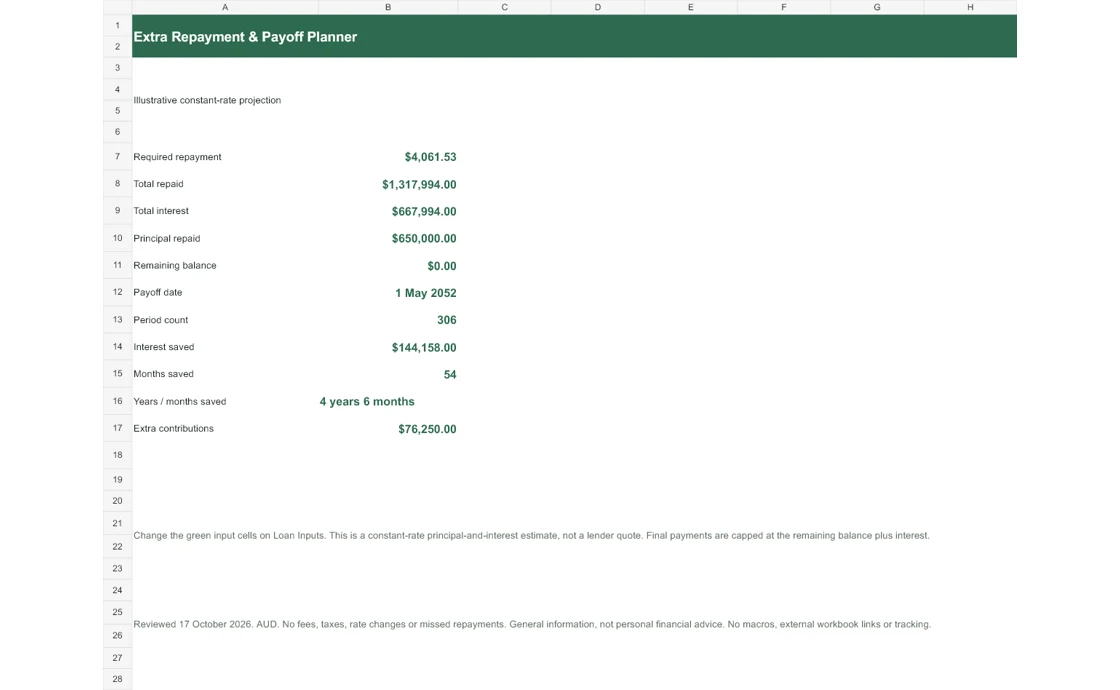
For an illustrative $650,000 balance at 6.39% over 30 years, the scheduled monthly payment is $4,061.53. Adding $250 each month reduces modelled payoff time by 54 months and saves approximately $144,158 interest, compared with no extra. The accelerated total interest is approximately $667,994.
The example uses a constant rate and no fees. The custom schedule records $76,250 of extra contributions; the final repayment is smaller than a full regular payment. Compare the whole schedule rather than multiplying a monthly extra by the original 30-year term.
Methodology and frequency conversion
This follows Calcy’s extra-repayment engine. The required base payment uses the selected 12, 26 or 52 annual periods. The entered extra amount is annualised using its own frequency, then spread evenly across the base repayment periods. For example, $100 weekly has a $5,200 annual budget, equivalent to $433.33 per month before display rounding.
Extra frequency represents a spending budget rather than exact bank debit dates. The engine applies scheduled payment first, then caps the extra at the remaining amount owing. The scenario table solves the same constant-period recurrence in closed form; the custom schedule exposes each step.
Interpreting time and savings
Interest totals and interest savings are rounded to whole dollars to match the web engine. Payoff periods are converted to the nearest whole month for its time-saved and payoff-date display. Weekly and fortnightly calendars are therefore approximate when expressed as months.
Months saved and interest saved compare with the no-extra baseline using the same original loan, rate and term. They do not include refinancing fees, tax effects, changes in rate or the opportunity cost of the extra money. There is no one-off lump-sum input in this version.
Use the workbook safely
Change only green-shaded inputs. Zero rate, zero balance and an extra larger than the remaining loan are supported. Invalid text, blank required values, negative amounts or a term outside 1–40 whole years make the outputs unavailable. Formula protection reduces accidental edits without preventing input changes.
Start with a small extra, inspect the custom schedule and save a copy with a descriptive name. Then compare alternatives in separate copies. Recheck against your lender’s statement before changing a standing order.
Check the method and compare online
Read ASIC Moneysmart on paying off a mortgage faster and how mortgage offset accounts work. These explain the concepts; the workbook uses Calcy’s stated model assumptions.
Optional email updates
Get new Calcy tools and home-buying updates
Free calculators, spreadsheets and practical Australian home-buying resources. Unsubscribe anytime. Confirm your address by email before receiving updates. Downloading never signs you up.
Frequently asked questions
Can I enter weekly extra repayments?
Yes. Choose the extra frequency separately from the loan frequency. The extra is annualised and spread evenly over the loan periods, matching Calcy’s approximation.
Does it include lump sums?
No. This workbook models regular extras only. The online extra repayments calculator also offers a separate lump-sum option.
What if my extra exceeds the remaining balance?
The final extra is capped at the amount still owed after the scheduled payment. The ending balance cannot become negative.
Are these guaranteed interest savings?
No. They are constant-rate model estimates. Lender interest methods, repayment restrictions, fees and changing rates can alter the outcome.
General information and estimates, not personal financial advice. Check assumptions and official sources before making decisions.